Your SaaS can work exactly as intended and still expose something it should not: a database reachable from the internet, an API that accepts the wrong user's request, or a service running with unsafe permissions. Functional testing checks whether your product works. Security testing asks how someone could misuse it.
Automated penetration testing uses software to perform repeatable parts of an authorized security assessment, including discovery, vulnerability testing, and—in platforms that support it—controlled exploit verification. The aim is to determine which weaknesses create a usable attack path and provide evidence your team can act on.
The term covers products with different capabilities. Some automate individual tests; others coordinate discovery, testing, and verification across an assessment. Before choosing one, look beyond the label and ask what it actually tests, what access it needs, and how it proves a finding.
What is automated penetration testing?
A penetration test is an authorized attempt to identify and demonstrate security weaknesses within an agreed scope. Automation lets software carry out parts of that work consistently, rather than requiring a person to repeat every step.
Depending on the platform, automated penetration testing software may:
- Discover exposed hosts, services, web routes, and API endpoints.
- Test supported vulnerability classes and configuration weaknesses.
- Attempt controlled verification of a suspected vulnerability.
- Explore whether findings can connect into a larger attack path.
- Produce findings, evidence, and remediation guidance.
- Repeat supported tests after a fix.
Not every product performs all of these tasks. An external assessment also sees a different surface from a test with application credentials or internal network access. A tool cannot evaluate a workflow it cannot reach.
Automation can make testing more repeatable, but a repeatable test is not automatically continuous testing. Continuous testing also requires a defined schedule or trigger, maintained scope, and a process for reviewing results.
How does automated penetration testing work?
The implementation varies, but a useful assessment follows a clear lifecycle. NIST's technical assessment guidance emphasises planning the assessment, conducting the tests, analysing findings, and developing mitigation strategies.[1]
1. Define the target and boundaries
Start with what you own or have permission to test: domains, IP addresses, applications, or APIs. Define exclusions, allowed techniques, credentials if needed, and an appropriate testing window.
For a SaaS application, the frontend and backend may live on different hosts. Including the website alone may leave the API outside the assessment. Third-party payment providers and shared infrastructure require separate consideration; owning an application does not give you authority to test everything it connects to.
2. Discover the accessible attack surface
The platform identifies what is reachable within scope. This might include public services, application endpoints, technology fingerprints, and exposed configuration files.
Discovery matters because testing depends on coverage. A route hidden behind a login, an undocumented endpoint, or a service outside the supplied scope can be missed. The report should explain what was assessed and what was inaccessible.
3. Test for supported weaknesses
The platform performs checks against the discovered surface. A web-focused product may test application inputs and configuration; a network-focused product may concentrate on exposed services and credentials. Some support both.
The OWASP Web Security Testing Guide describes many distinct testing areas, including configuration, authentication, authorization, session management, and business logic.[2] A claim to cover application security should therefore come with a clear explanation of the tests performed and their prerequisites.
4. Verify exploitability where supported
A suspected weakness and a demonstrated vulnerability are different findings.
For example, identifying a service version associated with a known vulnerability provides a reason to investigate. It does not, by itself, establish that the vulnerable behaviour is reachable in this deployment. A verification step gathers evidence that the issue can actually be triggered under the tested conditions.
Evidence might include a sanitised request and response, a reproducible authorization failure, or a controlled demonstration of access beyond the intended boundary. The verification method should be appropriate to the target and agreed testing rules.
An unsuccessful verification attempt is not proof that an issue is harmless. A platform should make uncertainty visible rather than quietly turning an inconclusive test into a clean result.
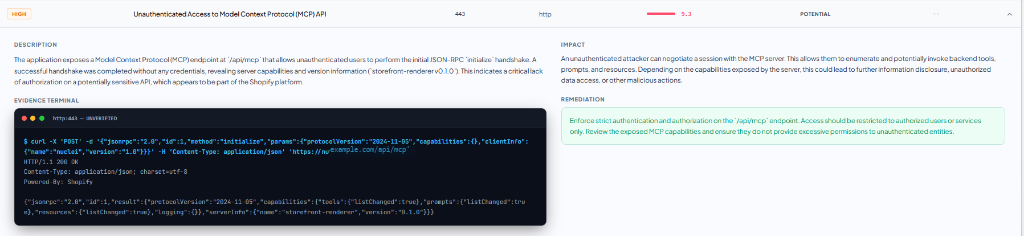
This finding is marked potential rather than verified. The captured response supports further investigation; additional testing is needed to establish unauthorized access or impact.
5. Report findings and retest fixes
A useful finding answers four questions:
- What is affected?
- What evidence supports the finding?
- What could the weakness allow under the tested conditions?
- What should the developer change, and how can the fix be checked?
After remediation, repeat the relevant test. A retest establishes whether the observed behaviour changed; it does not certify that the entire application is free of vulnerabilities.
Automated penetration testing versus vulnerability scanning
Vulnerability scanning helps discover likely weaknesses through techniques such as configuration checks, application probes, and known-vulnerability detection. Scanners vary: they are not all limited to version matching, and some perform active checks.
The useful distinction is how far the assessment goes toward demonstrating exploitability and impact. A scan may identify an issue to investigate; a pentest aims to establish what an attacker could accomplish within scope.
For a deeper comparison, read Vulnerability Scanning vs. Autonomous Pentesting.
When evaluating a product, ask to see its evidence and methodology. The word “pentest” on a landing page does not explain whether it verifies individual findings, investigates attack chains, or only produces alerts.
What can automated penetration testing find?
Coverage depends on the product, configuration, target access, and supported tests. Common areas to evaluate include:
| Area | Example of a weakness | What affects coverage |
|---|---|---|
| Exposed infrastructure | A database or administrative service reachable from the internet | Target scope, network visibility, and service support |
| Deployment configuration | Exposed secrets or unsafe access settings | Which files, endpoints, and configurations are accessible |
| Application inputs | Injection or other unsafe input handling | Crawling, input discovery, and supported checks |
| Authorization | One account accessing a resource belonging to another | Test accounts, roles, and knowledge of intended permissions |
| Attack paths | Several weaknesses combining into greater access | Verification capability, environment context, and permitted actions |
For a small SaaS team, the practical question is not “How many vulnerability types are advertised?” It is “Does the assessment cover the assets, user roles, and workflows that matter to our product?”
Consider a hypothetical application with a public marketing site, an authenticated dashboard, and a separate API. An unauthenticated external test can examine the reachable perimeter, but account-boundary tests may require two accounts and a definition of which data each account is allowed to access. The scope should reflect that difference.
Can penetration testing be fully automated?
Many repeatable tasks can be automated. Deciding what the results mean can still require knowledge of the application and its business rules.
For example, a tool may observe that a request succeeds. To determine whether that success is a security failure, it may need to understand which role should be allowed to perform the action. Business-logic testing is especially sensitive to this context. OWASP highlights the difficulty automated tools have understanding application-specific business processes.[3]
Manual testing remains valuable for complex workflows, unusual integrations, incomplete automated coverage, and investigations that need deeper contextual reasoning. AI-assisted orchestration can support testing, but an AI label does not establish complete coverage.
| Consideration | Automated testing | Manual testing |
|---|---|---|
| Repeating supported checks | Can repeat defined tests consistently | Usually requires additional tester time |
| Business context | Depends on supplied context and product capability | A tester can investigate intended rules with your team |
| Coverage | Bounded by scope, access, and implemented techniques | Bounded by scope, access, time, and tester expertise |
| Verification | Some platforms verify supported findings | Testers can select and adapt verification methods |
| Best use | Repeatable assessments and supported retests | Context-heavy workflows and deeper investigation |
A practical programme can use both. Automation supplies repeatable feedback; human testing addresses important gaps and questions that need application-specific investigation.
How to choose automated penetration testing software
Use these questions when assessing a product or reviewing a sample report:
Does it cover your actual deployment? Check support for your frontend, API, exposed services, and authenticated areas. Identify exclusions before starting.
What does it verify? Ask how the product distinguishes potential, verified, and inconclusive findings. Review evidence quality rather than relying on the size of the vulnerability list.
What controls the test? Understand scope enforcement, allowed techniques, rate controls, and how to stop an assessment. Choose a test environment and window appropriate to the activity; active testing carries operational risk even with safeguards.
Can developers use the report? Look for affected locations, evidence, meaningful impact explanations, and specific remediation steps.
Can you retest? Establish how fixes are checked and whether retesting is included or separately charged.
What happens to assessment data? Review how credentials, evidence, and reports are stored, accessed, retained, and deleted.
If you need a report for a customer assessment or compliance process, confirm the required scope, methodology, and reviewer requirements with the recipient before buying. A framework mapping alone does not establish that a particular report will be accepted.
Where NeuraPent fits
NeuraPent is built for SaaS founders and small teams that want to assess their web and backend exposure without assembling and coordinating the testing workflow themselves.
Its free audit provides an initial assessment of potential weaknesses. Its full autonomous pentest adds attack chaining, exploit verification, and reporting. These serve different stages: discovery helps identify where to investigate; verification helps establish the impact of supported findings.
You can review how NeuraPent works, explore its testing solutions, or view the sample report before choosing an assessment.
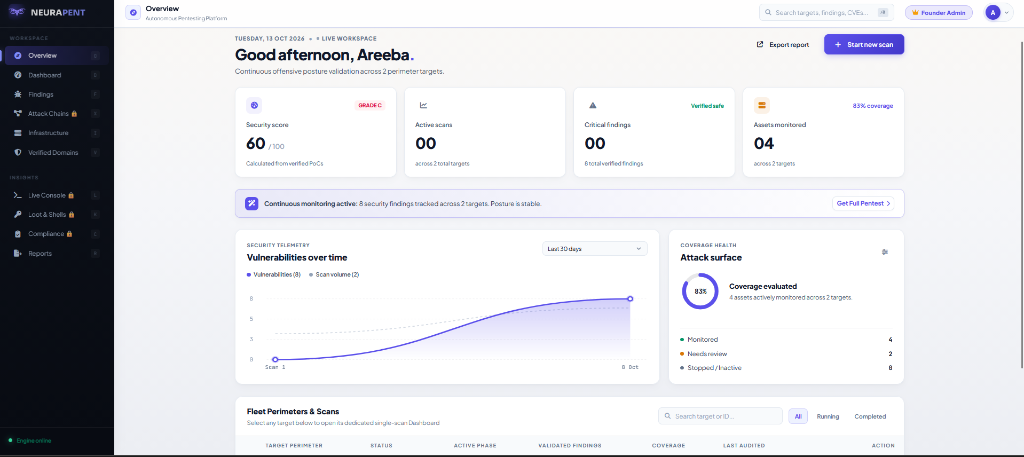
Start with your own attack surface
If your SaaS is already live, start by checking the assets you own and are authorised to assess. Review the findings, address the clear issues, and use deeper testing where verification or application context is needed.
Run a free NeuraPent audit to take that first step.
Frequently asked questions
Is automated penetration testing the same as AI penetration testing?
No. Automation can use predefined rules and workflows without AI. AI-assisted products may use models to support planning, analysis, or tool selection. Evaluate the implemented tests and evidence rather than treating either label as a guarantee of quality.
Can an automated pentest test APIs?
Some products support API testing, but coverage depends on endpoint discovery, supported protocols, credentials, and permission context. Confirm that your API is included in scope and ask how authenticated endpoints and different user roles are assessed.
How often should testing run?
Choose a cadence based on risk and the changes your application undergoes. New authentication flows, changes to access controls, and major deployment changes are useful reasons to reassess. Repeating a perimeter test does not replace reviewing a new workflow it cannot reach.
Does a clean report mean my SaaS is secure?
It means the assessment did not identify reportable issues under its scope and test conditions. Read the exclusions and coverage notes, maintain secure development practices, and investigate important areas that were not assessed.