If you run a SaaS product, you need to know more than whether your application is online and working. You also need to know whether a user can access another customer's records, whether an API accepts a request it should reject, or whether several small weaknesses can be combined into a serious attack path.
Manual and automated penetration testing both help uncover security weaknesses, but they do the work differently. Manual penetration testing relies on a security tester's investigation and judgment. Automated penetration testing uses software to perform supported checks and, in more capable platforms, coordinate multi-step testing and verification. Neither approach finds every possible issue, and the label alone does not tell you how thorough a test will be.
For most SaaS teams, the practical choice is not simply one or the other. Automation can make repeatable testing easier to run as an application changes; human-led testing remains important for complex business logic, unusual workflows, and questions that need contextual judgment. The right balance depends on your application's risk, the scope of the test, and what evidence you need.
Manual vs automated penetration testing at a glance
| Factor | Manual penetration testing | Automated penetration testing |
|---|---|---|
| Who drives the test? | A human penetration tester makes decisions and adapts the investigation | Software runs defined tests; more advanced platforms can coordinate test steps within their supported scope |
| Speed | Usually takes days or weeks for a scoped engagement, depending on complexity | Supported checks can run in minutes or hours; scope and verification can extend the run |
| Repeatability | Depends on the test plan, notes, tools, and tester | Repeatable checks can be rerun on a schedule or after changes |
| Breadth | Often prioritizes selected assets and high-risk workflows | Can test many supported hosts, routes, parameters, and known weakness patterns quickly |
| Context and business logic | Strong when the tester understands the application's rules and user roles | Limited unless the platform can model or be configured for the relevant workflows |
| Attack chains | A skilled tester can creatively investigate how weaknesses combine | Capable platforms may chain supported findings, but chaining depth varies substantially |
| False positives | Human review can validate context and dismiss incorrect results; manual work is not infallible | Results can include unconfirmed or noisy findings; quality depends on the tool and verification process |
| Cost model | Commonly priced around specialist time and engagement scope | Often better suited to frequent repeat testing, but platform fees, setup, and review still matter |
| Best fit | Deep investigation, unusual logic, high-risk workflows, and specialist scopes | Repeatable checks, broad supported coverage, and more frequent assessment of changing applications |
These are general tendencies, not guarantees. A well-configured automated platform can be more useful than a shallow manual engagement for a particular question, while a carefully scoped human-led test can find issues an off-the-shelf tool will miss. Compare the actual methodology and evidence—not just the words “manual” and “automated.”
What is manual penetration testing?
Manual penetration testing is an authorized security assessment in which a human tester investigates an application or system, forms hypotheses about how it could be abused, and tests those hypotheses within an agreed scope.
A tester may inspect the application's behavior, use an intercepting proxy to modify requests, test authentication and authorization boundaries, examine API responses, and follow a suspected weakness to understand its real impact. The tester can adapt when the application behaves in an unexpected way or when one finding suggests another avenue to investigate.
For a SaaS product, manual testing can be especially valuable for questions such as:
- Can one customer access another customer's data by changing an object ID?
- Can a user with a low-privilege role perform an administrator-only action through a direct API request?
- Can a sequence of otherwise valid actions bypass a payment, approval, or account-recovery rule?
- Does the application's workflow expose sensitive information only after several conditions are combined?
- Can a tester turn several lower-severity weaknesses into a more consequential attack path?
The answers depend on the tester's skill, time, access, and test plan. Manual testing is not automatically comprehensive, and a report from a human tester is not proof that every possible vulnerability has been found.
Strengths of manual testing
- Contextual judgment: A tester can interpret what the application is supposed to do and look for violations of those rules.
- Adaptive investigation: The next test can change based on evidence from the previous step.
- Complex workflows: Human-led testing is useful when a flaw depends on a sequence of actions, user roles, or application-specific assumptions.
- Interpretation and communication: A good tester can explain the likely impact, relevant conditions, and practical remediation options.
Limitations of manual testing
- Specialist time is limited: A human-led engagement has a defined duration and scope. It cannot test every input or state exhaustively.
- Cost can constrain frequency: A team may only commission a manual test occasionally, leaving later code changes outside that assessment.
- Results vary by scope and methodology: Two engagements can differ in what they inspect and how deeply they investigate.
- Retesting requires planning: Fixes should be checked, but follow-up testing may need to be scheduled and funded separately.
Manual testing is often the better fit when the key question requires understanding the application's intended behavior, not just detecting a recognizable technical pattern.
What is automated penetration testing?
Automated penetration testing uses software to perform repeatable parts of an authorized security assessment. Depending on the product, this may include asset discovery, crawling, testing for supported vulnerability classes, checking configuration weaknesses, validating suspected issues, or attempting to connect findings into an attack path.
The term covers a wide range of capabilities. A traditional vulnerability scanner may identify known issues and misconfigurations. A dynamic application security testing (DAST) tool sends requests to a running application and looks for security weaknesses. More advanced autonomous testing platforms attempt to coordinate several steps of an assessment and may verify exploitability or explore supported attack chains. For a deeper breakdown of how modern platforms coordinate discovery, testing, and exploit verification, read our guide to automated penetration testing.
These tools are not interchangeable. A product calling itself an automated pentest platform does not, by itself, prove that it performs meaningful exploitation, verifies every finding, or tests application-specific business logic. Ask for the actual scope, test methods, evidence, and limitations.
Strengths of automated testing
- Speed for supported checks: Software can execute many repeatable tests faster than a person can perform each one manually.
- Repeatability: Teams can rerun supported checks after releases, infrastructure changes, or fixes.
- Broad, consistent execution: Automation can help cover large sets of known test cases and supported endpoints.
- Earlier feedback: When integrated into a development or release workflow, security checks can identify some issues before they accumulate.
- Evidence and reporting: Good tools preserve requests, responses, reproduction details, and remediation guidance so findings can be reviewed.
Limitations of automated testing
- Coverage is bounded by the tool: A product can only test what it can reach and what its methods support. Authentication, scope, configuration, and application state all affect results.
- Business logic is difficult: A generic tool may not know that a discount should only apply once, that one tenant must never read another tenant's data, or that a particular approval sequence is mandatory.
- Findings need interpretation: A reported weakness may be false positive, unverified, or less severe than its label suggests. Evidence and controlled verification matter.
- A clean result is not proof of security: No tool can establish that every vulnerability is absent merely because it did not report one.
- “Automated” does not always mean “continuous”: Continuous testing requires a maintained scope and a schedule or trigger, plus a process for reviewing and acting on results.
The key question is not simply whether a tool is automated. It is which tests it runs, how it handles authenticated workflows, whether it verifies findings, and what remains outside its scope.
The biggest differences: speed, depth, coverage, and confidence
Speed and testing frequency
Automation is useful when a team needs to repeat supported checks frequently. For example, a SaaS team can rerun an assessment after a new API endpoint is introduced or after a security fix is deployed. This helps shorten the time between a change and the next round of security feedback.
Manual testing usually takes more coordination and specialist time, so teams may use it at important milestones: before a major launch, after a significant architecture change, or when a high-risk workflow needs deeper investigation.
Speed should not be confused with completeness. A test that finishes quickly may have a narrow scope or perform only a limited set of checks. A longer test is not automatically better either; ask what was tested and what evidence supports the result.
Breadth versus depth
Automated tools can repeat supported checks across many assets and inputs. Manual testers may spend more time on fewer areas, exploring them in greater depth. The distinction is not absolute: automation can be deep when it supports stateful workflows and controlled attack chaining, while a manual engagement can be shallow if its scope or time is too limited.
When comparing tools or service providers, ask for a scope statement that lists the assets, application areas, authentication assumptions, and test categories included. A large number of requests or findings does not, on its own, show meaningful coverage.
Business logic and authorization
Business logic vulnerabilities occur when an application permits an action that violates its intended rules. Examples include bypassing a subscription limit, manipulating an order sequence, abusing account recovery, or accessing another tenant's records.
These issues often depend on context. A request may be technically valid but still violate the product's business rules. Manual testers are well suited to exploring these cases. Automation can test them too when the relevant rules and workflows are encoded or otherwise supported—but do not assume a generic scanner understands them.
For SaaS applications, role-based access control and tenant isolation deserve special attention. A test should establish not only whether an endpoint responds, but whether the right user can perform the action and access the returned data.
Attack chaining and exploit verification
A single weakness may appear low risk in isolation but become more serious when combined with another weakness. Attack-chain testing asks whether a sequence of issues can lead to a meaningful outcome, such as access to a restricted function or sensitive data.
Some autonomous penetration testing platforms attempt to explore these chains and verify suspected vulnerabilities. Capabilities vary, so ask whether the platform merely correlates findings, attempts controlled exploitation, or captures evidence that demonstrates impact. A list of related findings is not the same as a verified attack path.
Verification also needs safety boundaries. Testing should be authorized, limited to the agreed targets, and designed to avoid unnecessary data access, service disruption, or destructive actions.
False positives and confidence
Both methods can produce mistakes. Automated tools may flag behavior that is not exploitable in the application's context. Human testers can misinterpret evidence, miss a condition, or make an incorrect severity judgment.
A useful report distinguishes confirmed findings from potential or unverified observations. It should include enough evidence for an engineer to understand the issue, reproduce it safely, and determine whether the suggested fix works. Severity should reflect the demonstrated impact and the conditions required—not merely a scanner's label.
When evaluating a platform, ask how it marks unverified findings, what evidence it records, whether a reviewer can reproduce the result, and how retesting is handled.
Which approach should a SaaS team choose?
The answer depends on what you are trying to learn and how often your product changes.
| Situation | Practical starting point | Why |
|---|---|---|
| You want recurring checks as the product changes | Automated testing | Supported tests can be repeated more frequently than a one-off engagement |
| You are preparing to launch a new SaaS application | Combine automated assessment with targeted manual review | Automation can identify supported technical weaknesses; a tester can investigate critical workflows and access boundaries |
| Your application has sensitive multi-tenant data or complex roles | Prioritize targeted manual testing alongside automation | Tenant isolation and authorization depend on application-specific rules |
| You need to check whether a known issue was fixed | Focused retesting, automated where appropriate | Repeatable checks can provide faster feedback, but the test must actually cover the reported condition |
| You have a broad external attack surface | Automated discovery and supported testing, followed by prioritization | Software can help inventory and check many exposed assets; results still need scope and risk review |
| You need an assessment for a customer, auditor, or compliance program | Confirm the exact required scope and methodology first | Requirements differ; a tool's report alone may not satisfy a particular obligation |
| You suspect a complex attack path or unusual workflow abuse | Manual investigation, potentially supported by tools | Contextual reasoning and adaptive testing may be necessary |
A sensible plan for a small team is to automate repeatable checks that match the application's scope and risk, then use human expertise for areas where business context or deeper investigation matters. Revisit the balance as the product, threat model, and customer requirements change.
Manual vs automated penetration testing: what about cost?
Manual testing is commonly priced around the time and expertise needed for a defined engagement. Cost varies with application complexity, number of assets, authentication requirements, test depth, reporting, and retesting. A narrow test of one application is not comparable to a multi-environment assessment with several roles and APIs.
Automated platforms may make frequent testing more affordable per run, but the full cost includes more than the subscription or scan. Consider setup, authentication configuration, scope maintenance, result triage, remediation work, and the expertise needed to investigate findings. Some products also charge based on assets, targets, or assessment volume.
Avoid comparing a short automated scan with a comprehensive manual engagement as if they were equivalent deliverables. Compare what each option actually tests, how findings are verified, what evidence is supplied, and whether retesting is included.
How to evaluate an automated penetration testing platform
Before choosing software, ask concrete questions:
- What can it test? Confirm support for your web application, APIs, authentication model, and relevant environments.
- What does “penetration testing” mean for this product? Ask which steps are automated, whether it attempts controlled exploitation, and whether it can test supported attack chains.
- How does it treat uncertain findings? Look for clear statuses, evidence, reproduction steps, and remediation guidance.
- What is excluded? Ask about business logic, complex authenticated workflows, mobile applications, source-code review, cloud configuration, social engineering, and other scopes that may not be covered.
- Can it be run again safely? Understand scheduling, target limits, rate controls, test impact, and what happens when an application changes.
- Can engineers act on the output? A useful report should help the team prioritize and fix issues, not merely present a long list of alerts.
- What proof can you inspect? Request a representative report and check whether the evidence supports the claims.
- Does it fit your obligations? Confirm any customer, regulatory, or contractual requirements independently; do not assume a platform automatically satisfies them.
These questions are more useful than comparing products by the number of checks they advertise. Test coverage, verification quality, scope, and actionable evidence matter more than a headline count.
Where NeuraPent fits
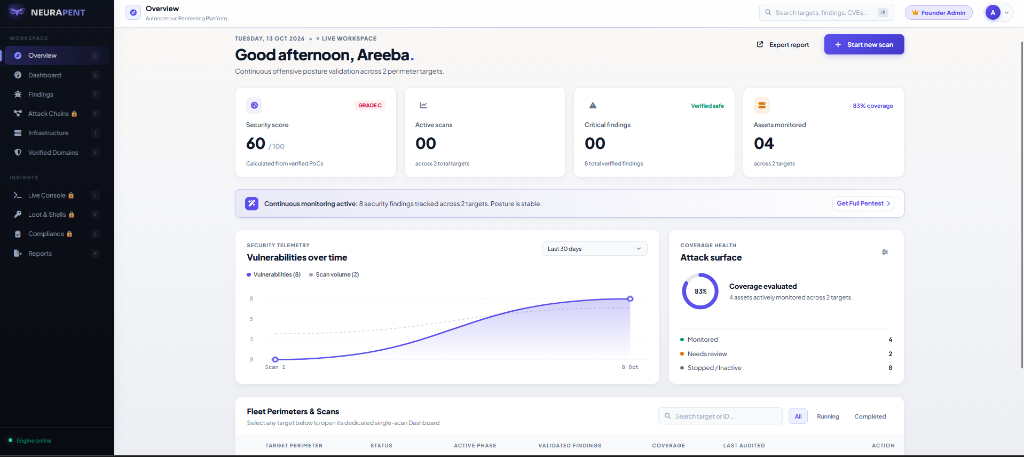
NeuraPent is designed to help teams assess supported web assets through an automated, agentic security-testing workflow. It can be a practical option when a SaaS team wants an initial assessment of potential weaknesses and a repeatable way to investigate supported findings.
The free NeuraPent audit provides an initial assessment. The full pentest adds attack chaining, verification, and professional reporting according to the current offer. As with any platform, the useful question is what the assessment actually tested and what its evidence establishes. Review finding status carefully, and treat potential or unverified results as items that need further investigation rather than confirmed vulnerabilities.
NeuraPent is not a claim that every security task can be automated or that every human-led assessment is unnecessary. For applications with complex business logic, sensitive authorization boundaries, specialist testing needs, or explicit independent assessment requirements, targeted human-led testing may still be appropriate.
Want an initial look at your own application? Run a free NeuraPent audit. Only test assets you own or have explicit authorization to assess.
Frequently asked questions
Is manual penetration testing better than automated penetration testing?
Neither is universally better. Manual testing is useful for contextual investigation and complex application-specific behavior. Automation is useful for repeatable supported checks and broader testing at higher frequency. The right choice depends on the target, scope, risk, and evidence required.
Can automated penetration testing replace a human penetration tester?
Not for every scope. Some platforms can automate substantial parts of an assessment, including supported verification and attack chaining, but complex business logic, unusual workflows, and specialist testing may still require human expertise. Check the platform's actual capabilities rather than relying on its label.
Is automated penetration testing the same as vulnerability scanning?
No, although the terms can overlap in product marketing. Vulnerability scanning typically identifies known weakness patterns and misconfigurations. Automated penetration testing may go further by attempting to verify whether suspected weaknesses are exploitable or whether supported findings can be chained. The difference depends on the methods the product actually performs. Read our comparison of vulnerability scanning and autonomous penetration testing.
Does automated testing find business logic vulnerabilities?
It can find some when the relevant rules or workflows are supported and configured, but generic automation may not understand application-specific expectations. For example, a tool cannot reliably judge every misuse of a subscription workflow unless it can test the relevant states and rules. High-risk logic and authorization paths often benefit from targeted manual testing.
How often should a SaaS application be tested?
There is no single schedule for every application. Repeat supported automated checks when meaningful changes occur and on a cadence appropriate to the application's risk. Arrange deeper testing around major releases, architecture changes, sensitive workflows, and customer or compliance requirements. The important thing is to maintain scope and follow findings through remediation and retesting.
Does a clean automated test mean my SaaS is secure?
No. It means the test did not report issues within its scope and capabilities. It does not prove that all vulnerabilities are absent. Review what was tested, what was excluded, and whether important authenticated workflows and business rules were covered.
Can a company use both manual and automated testing?
Yes. Many teams use automation for repeatable checks and human-led testing for deeper investigation, complex workflows, and risk areas that need context. The two approaches can complement each other when their scopes are clear and the results feed into one remediation process.
Sources
- OWASP, Web Security Testing Guide.
- OWASP Developer Guide, Security Testing Tools.
- OWASP, Application Security Verification Standard — Assessment and Certification.